Wednesday, 3 February 2010

Thursday, 26 November 2009
Unit 3 Task 9
Quality Assurance Processes
Quality Procedures
Quality Documentation
Document control is a way of providing quality by creating forms, report and logs to record what quality processes have been made and also how these documents are stored and distributed to staff, customers and suppliers. These documents need to be kept up to date with changes in location and changes in staff.
Risk Assessment Reports
Risk assessment reports are important because they ensure that staff, customers and suppliers in the work place are in a safe environment with minimal risk of being injured. Risk assessments need to be made for each workstation that staff members work at as well as the rooms they are in and the equipment they use.
Procedures and Policies
Procedures and policies are another important part of document control. Procedures and policies are in place to make sure that every one knows what to do under certain circumstances. Quality assurance is not just about health and safety in the workplace it is also about quality of work and services provided by a company. Service level agreements, customer complaints and procurement procedures are example documentation of this
Fault Logs
Fault logs are used to provide information on problems and what was done to fix it, fault logs are used to record a range of information about how the fault occurred and what was used to fix it.
Audit Records
Audit documents are used to record quality assurance of any equipment that the workplace uses whether it be a component or a fully built computer, or if it will be used daily or only under special circumstances. Every piece of equipment is subject to the same quality assurance procedures and correctly documented. Documents that would be used include power up test documentation, installation record and delivery inspection.
Repair Logs
Computers occasionally fail and will need repairing, repair logs should be kept (for a number of reasons) for future reference. Repair logs contain a lot of information about the repairing that has been done as well as possible causes.
Receiving and Inspection
Inspecting Equipment and Checking Installation
Receiving and inspecting equipment is crucial because it needs to be claimed as damaged on receipt if any damage is found. Packaging needs to be inspected then the components themselves, this is to make sure all equipment works straight away and to ensure no problems will occur.
Equipment needs to be PAT Tested (Portable Appliance Testing) this is to ensure that the electrical appliances are safe to use by public and employees.
All equipment needs to be documented including serial numbers, make and model. This is so if a components fails it is easier to replace also if equipment is stolen it becomes easier to report.
Inspecting Services
Customer feedback is important, it is used to fix problems like parts of a website not working properly or informing that a repair is not working. This is important because it allows the company to make the changes and become more reliable and easy to access be the customers. Supplier evaluation is important because it shows how reliable and trustworthy a company is also it allows you to see how after sales customer service is.
Reporting Faults
Fault reporting is important because faults need to be fixed. Faults can be reported using fault logs, fault logs should be used for any type of fault because it allows future reference if the same problem persists.
Roles and Responsibilities
Different Job Roles
There are different types of job roles with the IT industry the roles include:
- IT Helpdesk
- IT Technician
- Network Administrator
- Supervisor
- Manager
An IT help desk is an assistance and information centre that troubleshoots problems with computers or similar products. Companies often provide help desk support to their customers via a landline, website or e-mail.
An IT Technician is a member of a company that provides services to fix, repair and maintain computer equipment within the company, if it's a company that sells IT equipment they may have to go outside of the business to fix and repair computers and computer paraphernalia.
A Network administrator is in charge of networks inside a company they maintain and repair problems with the network as well as administer the accounts that use the computers.
A Supervisor is responsible for a small group of staff they usually have managerial roles, although they are so similar supervisor cannot dismiss staff and also can not control budgets given in the business.
A manager is a member of staff that controls budget and resources, they are able to hire staff as well as dismiss staff. They are the bosses of there department.
Responsibilities
- IT Helpdesk - Deal with customer complaints, complete fault logs, assign priority to jobs, assign jobs to technicians
- IT Technician - Complete repair logs, record when jobs are completed on fault logs, draft quotations, complete audit/inspection documents, power up tests etc
- Network Administrator - Complete repair logs, record when jobs are completed on fault logs, draft quotations, complete audit/inspection documents, power up tests etc
- Supervisor - Carryout risk assessments (if Health and Safety trained), Annual staff reviews with staff, training reviews, deal with disciplinary issues, customer complaints
- Manager - In addition to supervisor jobs they are likely to complete Business Plans, Complete reviews on team performance, carryout salary assessments compare performance against SLA, deal with serious disciplinary issues, interview new staff.
In my experience my manager at work is quite dedicated and is always pushing his staff for more as the performance of his team reflects his ability. If the staff perform well he looks good and the company does well.
Thursday, 24 September 2009
Peer Reviews
Monday, 14 September 2009
Computer Cables
Data cables found inside the computer connect multiple devices together through the motherboard. Cables usually connect HDDs, optical disk drives and floppy drives to the motherboard.
There are two main types of cables inside a computer there are IDE and SATA. IDE and SATA connect both HDDs and optical disk drives to the computer.IDE is a ribbon of wire which is usually grey in colour and has large connectors at each end it is an older wire which is being replaced by Serial ATA which is a thin red colour wire which has a small connector. Both of these wires carry data at the same speed.
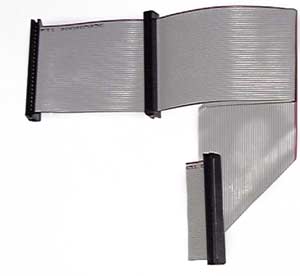
IDE cable
(Image Source: http://www.eurotronix.com/)
External Cables
There are many external cables these cables connect external components to the internal components.
There are cables which have USB connections USB has two types USB 1.1 and USB 2.0, the USB 1.1 has a transfer speed of 12 Mbps whereas USB 2.0 has a 480 Mbps transfer speed. There is also Fire wire cable which has two kinds. Fire wire 400 and Fire wire 800 which transfer speeds are 400 Mbps and 800 Mbps.
.jpg)
USB Cable
(Image source: http://www.danmeter.dk/)
There are also multiple kinds of video cable to output what the computer is doing. There are three types of video cable VGA, DVI and HDMI, VGA and DVI do not carry sound they purely produce the image. VGA is an analogue connection which does not carry sound, it was originally used to connect CRT monitors to the computer. DVI is a digital connection which has two types DVI-Digital (DVI-D) and DVI-Integrated (DVI-I). DVI-D can only be used with a digital output device whereas DVI-I can also carry an analogue signal.

DVI-I Cable
(Image source: http://www.cablek.com/)